



Kisan Hisab · Cloud Sync
Cloud Sync: your farm book, safe on a new phone
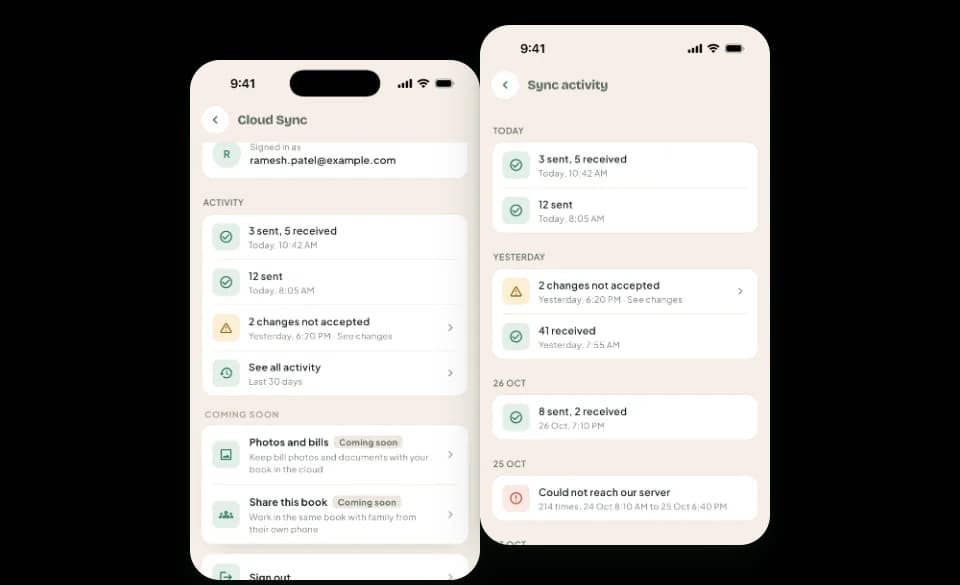
Cloud Sync, part of Pro, keeps a copy of your book on our server and updates it as you work, so a new phone can get your book back. Kisan Hisab still works fully without internet, and your phone always keeps its own complete book.
The problem it solves
- A phone is lost, broken or replaced, and the season’s records go with it.
- Backups are only as recent as the last time you made one.
How it works in Kisan Hisab
- Sign in from “More”. Anyone can sign in, for free, and signing in alone uploads nothing.
- Turn Cloud Sync on for your book. It is off until you choose it, and it runs while the book’s owner has Pro.
- Keep working as always, with or without signal: changes are sent when the phone is online.
- On a new phone, sign in with the same account and choose to get your book from Cloud Sync.
What you can keep
What syncs
Your records: entries, crops, parties, attendance, contracts and the rest. Bill photos and documents you add from now on go too, made smaller and with no location in them. Ones added before the update stay on your phone.
When Pro ends
Sync pauses. Your records on the phone are safe, and the app keeps working offline. Renew Pro to sync again.
Coming next
Sharing a book with another person is planned. It is not in the app yet.
Turning sync off
Your phone keeps every record. The cloud copy is kept as it is, and sync can be turned on again.
Removing the cloud copy
Deleted 30 days after you ask, with every record kept on your phone. Turn sync on again before then and the copy is kept.
How it works with the rest of the app
Common questions
What is Cloud Sync, and do I need it?
“Cloud Sync” keeps a copy of your book on our server and updates it as you work. If your phone is lost or replaced, your book comes back on the new phone.
You do not need it. The app works fully without it, with or without internet.
- It comes with Kisan Hisab Pro, and stays off until you turn it on.
- Your phone always keeps its own full copy. Changes made with no signal go up when the signal is back.
How do I turn on Cloud Sync?
- Open “More” and tap the “Cloud Sync” card.
- Read what is kept, then tap “Turn on Cloud Sync”.
- If you are not signed in, tap “Continue with Google”, or on iPhone “Continue with Apple”.
- Your book goes up. Keep using the app; if it stops, it carries on from there next time.
- Cloud Sync needs Pro on the account you sign in with. Without Pro, the card opens the plans first.
How do I get my book on a new or second phone?
- Install Kisan Hisab on the other phone.
- When it first opens, choose “Get my book from Cloud Sync”. Already set up, with no records yet? Open “More” > “Cloud Sync” and tap “Get my book”.
- Sign in with the Google or Apple account your book is kept under.
- Choose your book. It comes to your phone and keeps syncing here.
- Your phone already has its own book? On Home, tap your book's name at the top, tap your book from the cloud, then “Add book”. The two books stay apart and are never mixed.
- It needs Pro on the account. Without Cloud Sync, use a Google Drive backup instead.
What happens to Cloud Sync when my Pro ends?
Cloud Sync runs until the paid time ends, then pauses by itself. You are told before that day.
- Nothing on your phone is deleted, and the app keeps working offline.
- Changes you make wait on your phone, and the copy on our server is kept.
- Tap “Renew Pro” or buy Pro again, and sync carries on in the same book from where it stopped.
Is my data on the phone deleted if I turn Cloud Sync off?
No. Your phone stops sending and getting changes, and you keep working in your book with every record in it. The copy on our server is kept as it is, and you can turn sync on again at any time.
How do I remove my book from the cloud?
You can ask for the cloud copy of a book to be removed. It is deleted 30 days later, and every record stays on your phone.
If you turn Cloud Sync on again before then, the copy is kept.