



Kisan Hisab · Backup & restore
Back up and restore your farm records
Your records are saved on your phone first. Kisan Hisab backs them up to your own Google Drive, by hand or on its own every day, week or month, and brings them back on a new phone. You can also save a copy as a file. Backup is free for everyone.
The problem it solves
- A phone is lost, broken or changed, and the season’s records go with it.
- You do not want to send your farm accounts to someone else’s server.
- You forget to back up, and the last copy is months old.
How it works in Kisan Hisab
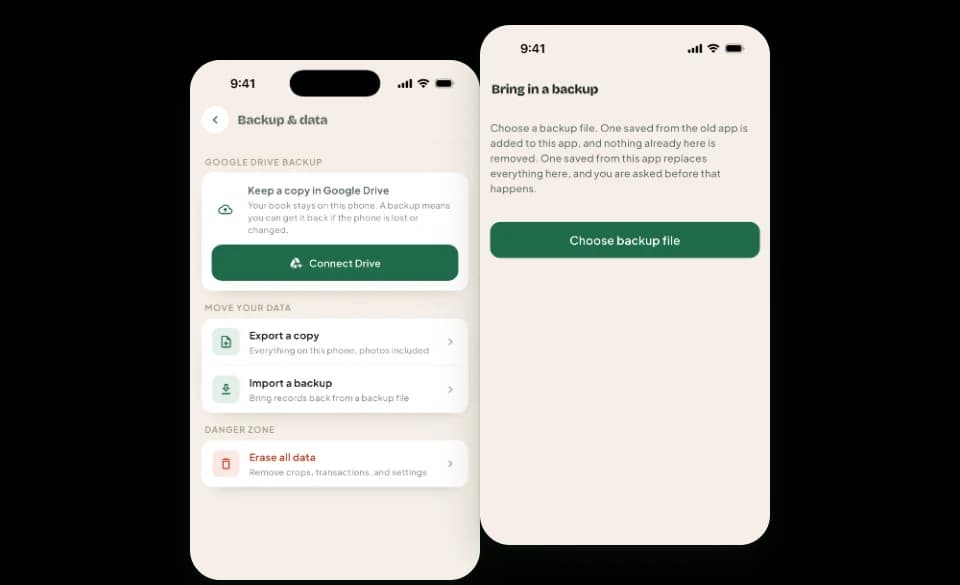
- Open “More” > “Backup & data” and tap “Connect Drive”. Sign in with your Google account.
- Tap “Back up” to make a copy now.
- Tap “Auto-backup” and choose how often. The backup then runs when you open the app.
- On a new phone, install the app, connect the same Google account, tap “Restore”, choose the backup and tap “Replace”.
- To keep a copy as a file instead, tap “Export a copy” and share it to yourself.
What you can keep
Google Drive backup
Kept in your own Google Drive, where we cannot see it. Free for everyone.
Auto-backup
Every day, week or month, when you open the app. Pro lets you choose how many backups are kept.
Restore
Brings the backup back on a new phone. It replaces everything now in the app, so it asks first.
A copy as a file
Everything in your book, photos included, in one file you can keep or send to yourself, and import again later.
How it works with the rest of the app
- Works without internetYour book works with no signal; internet is needed only to back up to Drive and to restore.
- Cloud SyncCloud Sync, part of Pro, is another way to get your book on a new phone. Drive backup stays free either way.
- Several booksBackups are made for the book that is open, and each book’s backups are kept apart.
Common questions
How do I back up my records?
- Open “More” > “Backup & data”.
- Tap “Connect Drive” and sign in with your Google account.
- Tap “Back up”.
- Tap “Auto-backup” and choose how often. The backup then runs when you open the app.
Backups are kept in your own Google Drive. We cannot see them.
I have a new phone. How do I get my records back?
- On the old phone, make a backup to Google Drive.
- On the new phone, install the app and finish the first steps.
- Open “More” > “Backup & data” and tap “Connect Drive” with the same Google account.
- Tap “Restore”, tap the backup, then “Replace”.
Restoring replaces everything now in the app with the backup.
How do I save a copy of my records as a file?
- Open “More” > “Backup & data”.
- Tap “Export a copy”.
- Tap “Share it” to send the file to yourself.
The file holds everything, photos included.
To bring it back, on your phone or a new one: on the same screen tap “Import a backup”, choose the file and confirm.
Bringing the file back replaces everything now in the app with what is in the file.
Where are my records kept?
Your records are saved on your phone.
When “Cloud Sync” is on, a copy of the book is also kept on our server, so it can come back on a new phone.
Without a backup or “Cloud Sync”, if the phone is lost or the app is removed, the records cannot be brought back. Please make a backup: see the backup questions below.
How do I erase everything and start again?
- Open “More” > “Backup & data”.
- At the bottom, tap “Erase all data”.
- Tick “I understand these records cannot be brought back” and tap “Erase”.
This removes every record and photo from the phone and cannot be undone. Make a backup first. Backups already in Google Drive are kept.